
Removing your Woolworths Group Relationship in Site360
Made by Support Site360 with Scribe
Quick reference guide on how to effectively remove your Woolworths Group relationship within the Site360 admin portal.
Signing into your Admin Portal
1. Sign into your admin portal: Site360 Log In
Removing the Relationship
2. Once signed in, you will be taken to the Relationships tab.
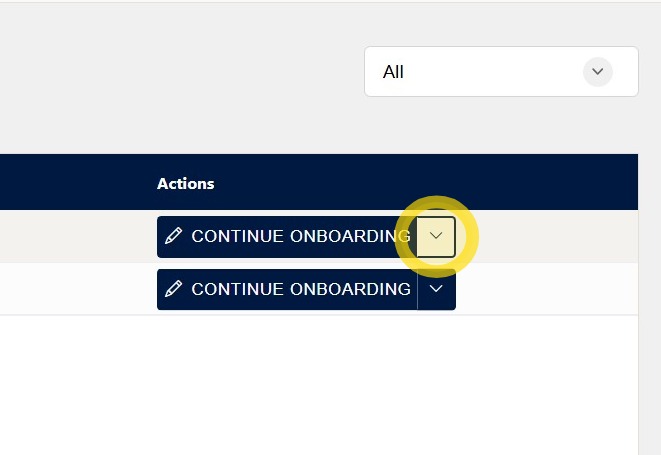
On the right-hand side of the screen, under the Actions heading, you will see Continue Onboarding and a drop-down arrow.
Click the drop-down arrow to view the available onboarding options and actions for the relationship.
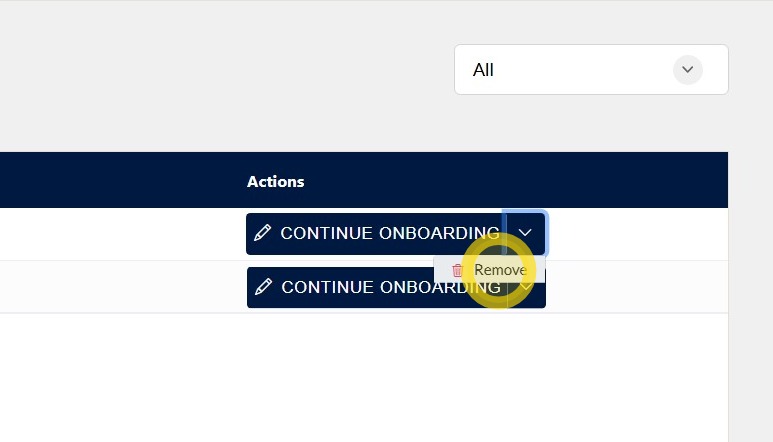
3. After clicking the drop-down arrow, a Remove option will appear.
Click Remove to begin the process of removing the relationship.
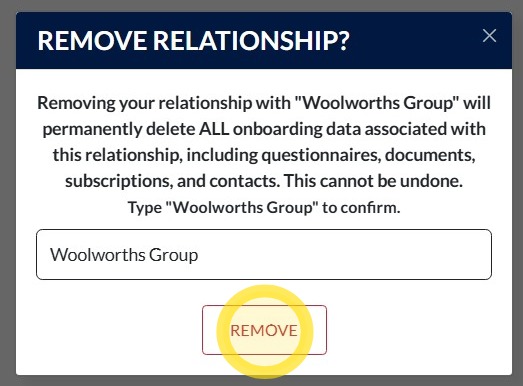
4. Read the alert and then enter Woolworths Group in the confirmation field.
Click Remove to confirm that you wish to remove the relationship.
Your relationship with Woolworths Group will now be removed.
Technical and Compliance Support
If you require help and guidance, you can find more helpful guides on the Help & Resources page found on the wowcontractor.com website, alternatively please contact the support or compliance team at Site360.
Phone - 1300 853 990
Email - support@site360.io or compliance@site360.io


